Apple HomeView in India: ₹39,900 Price, Wall Mount Costs and iPhone Requirements
Apple HomeView launches in India at ₹39,900, but the real buying decision depends on the wall-mount setup, iPhone requirements, Matter compatibility and what an Android-only household can use.
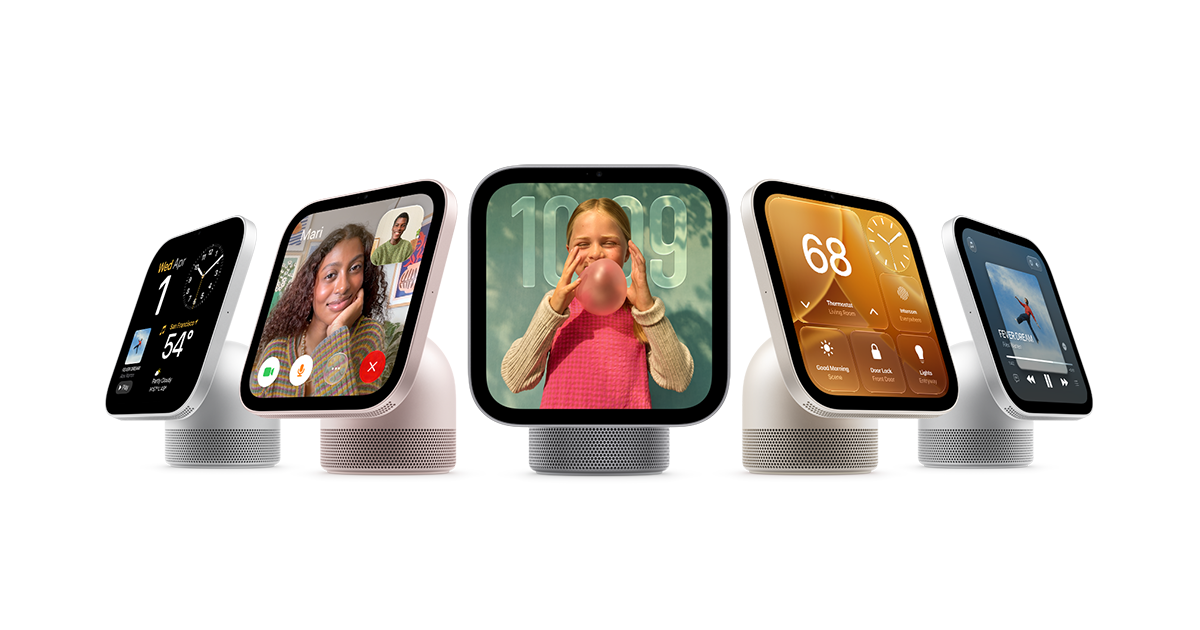
Apple HomeView is available in India from 13 November 2026, with Apple listing both the tabletop and wall-mounted models at ₹39,900. The headline price is only part of the decision. A wall-mounted installation requires a separate compatible mount and power solution, and setup plus multiuser support require a compatible iPhone or iPad.
HomeView is a 7-inch smart display with an A18 chip, Siri AI, speaker system and controls for compatible Apple Home accessories. It is designed to be shared around the house while recognising individual users, but it is not a neutral smart display for every phone ecosystem.
Apple HomeView India price
| Model or accessory | Apple India listed price | What is included or required |
|---|---|---|
| HomeView tabletop | ₹39,900 | USB-C cable and power adapter included |
| HomeView wall-mounted | ₹39,900 | Mount, USB-C cable and power adapter sold separately |
| Power Mount USB-C Wall Connector | From ₹6,900 | Requires a separate power adapter of at least 20W |
| Power Mount AC Wired | From ₹8,900 | Wall-mount power option; check current store availability |
| Power Mount PoE Wired | ₹14,900 | Apple said this option would arrive in early 2027 |
A wall-mounted HomeView with the USB-C Wall Connector therefore starts at ₹46,800 before the separately required 20W-or-higher adapter. The AC Wired combination starts at ₹48,800 at the listed mount price, but check whether it is actually orderable in India before budgeting for it. The PoE mount is not the same as an in-stock launch option; Apple announced it for early 2027.
For a tabletop setup, the included USB-C cable and adapter make the ₹39,900 price easier to understand. For the wall-mounted version, do not assume that the same bundle is in the box.
Does Apple HomeView require an iPhone?
For initial setup and multiuser support, yes: Apple specifies a compatible iPhone running iOS 27.2 or later, or a compatible iPad running iPadOS 27.2 or later, plus Wi-Fi internet access.
That makes HomeView a poor choice for an Android-only household that wants to manage the device independently. An Android phone cannot replace the Apple device requirement for setup and multiuser support.
There is a useful distinction for guests. Apple says people who are not recognised can still use some shared features, such as smart-home controls, weather, timers and music, without accessing the recognised user's personal information. That does not remove the iPhone or iPad requirement for the core setup and multiuser experience.
What does it actually do?
The hardware and software combine several jobs:
- Shared display: a 7-inch Liquid Retina screen for widgets, photos and household information.
- Personal profiles: Apple says the display can recognise up to six people and surface their personal content.
- Siri AI: built-in voice interaction, including broad knowledge and music discovery.
- Home controls: control compatible HomeKit and Matter accessories.
- Entertainment and calls: Apple Music, Podcasts, Apple TV, supported third-party apps and FaceTime features.
- Home monitoring: compatible cameras and HomeKit Secure Video features, subject to supported accessories and service requirements.
Those are platform capabilities, not proof that every app, camera or smart-home accessory will work in every country. Subscription requirements and regional app availability still apply.
Does Matter mean it works with every smart-home device?
No. Matter support is useful because it allows supported accessories to connect across compatible smart-home platforms. It does not guarantee every device exposes every feature or that every third-party camera feed is available inside Apple Home.
Before buying HomeView as a dashboard, list the exact devices you already own: plugs, bulbs, sensors, locks, thermostats and cameras. Check each model's Apple Home or Matter support, including the features you need. Be particularly careful with camera feeds: Apple's HomeKit Secure Video support is not a promise that every Ring or Google Nest camera can appear as a full camera tile.
If you are still choosing your smart-home foundation, our Matter, Thread, Wi-Fi and Zigbee guide explains why protocol names do not guarantee the same feature set.
Is Siri AI fully available in India?
Apple lists English-language Siri AI support in India. But personal-context requests have additional requirements: a paired Apple Intelligence-enabled iPhone or iPad, current software, Siri AI switched on and a supported language. Apple says some features can vary by region and language, and Siri AI is in beta in HomeView software version 27.2.
That means there are two levels to separate. A household can use HomeView's general voice and home-control functions without every member owning an Apple Intelligence device. More personal-context features depend on a compatible paired device and settings.
Who should consider buying it?
HomeView makes the most sense for a household already using iPhone or iPad, Apple Home and compatible accessories. It has a clear use as a shared display for home controls, timers, calls, music and household information.
It is harder to justify for an Android-only household, someone who only wants a speaker, or someone buying it mainly to display camera feeds from devices whose Apple Home compatibility has not been confirmed. Wall-mount buyers should add the mount and power costs before comparing it with a tabletop smart display.
Before placing an order
- Confirm that you have a compatible iPhone or iPad for setup and multiuser support.
- Decide whether tabletop placement is practical; wall mounting adds a mount and power solution.
- Add the mount and any separately sold adapter to the real cost.
- Check that your existing cameras and smart-home accessories work with Apple Home, not just their own apps.
- Confirm the apps and services you expect to use are available in India and whether they need subscriptions.
Final verdict
At ₹39,900, Apple HomeView is an expensive ecosystem screen rather than a simple smart speaker. The strongest reason to buy it is the combination of Apple Home controls, personalised household content and entertainment in a single display. The biggest reason to skip it is a mismatch with your phone ecosystem or existing smart-home devices.
The tabletop package is the cleaner way to understand the price. A wall-mounted setup needs a second calculation because compatible mounts and power parts are separate purchases. Check the current Apple Store listing on the day you order; accessory availability can change.
Sources
- Apple India: Apple HomeView
- Apple India Store: Buy Apple HomeView
- Apple Newsroom: Meet Apple HomeView, 13 October 2026
- Apple HomeView technical specifications
Prices and requirements checked against Apple India on 13 November 2026. No hands-on review, camera compatibility test or sound test was performed.
Frequently asked questions
- What is the Apple HomeView price in India?
- Apple lists both the tabletop and wall-mounted base models at ₹39,900. Wall-mount hardware and its power solution are separate purchases.
- Does Apple HomeView require an iPhone?
- Apple says setup and multiuser support require a compatible iPhone running iOS 27.2 or later, or a compatible iPad running iPadOS 27.2 or later.
- How much does a wall-mounted Apple HomeView cost?
- The wall-mounted base is listed at ₹39,900. Apple's USB-C Wall Connector starts at ₹6,900, taking the total to ₹46,800 before the separately required 20W-or-higher adapter.
- Does Apple HomeView work with Matter devices?
- It works with compatible HomeKit and Matter accessories, but Matter does not guarantee every device feature or camera feed. Check each exact accessory for Apple Home support.
- Is Siri AI available in India?
- Apple lists English Siri AI availability in India. Personal-context requests need a paired Apple Intelligence-enabled iPhone or iPad with current software and Siri AI enabled.
This article may contain affiliate links. If you purchase through them, Findory may earn a commission at no extra cost to you. Read our disclosure.

